


Regular price
$1,919.00
Regular price
Sale price
$1,919.00
Technical details
Plug-and-play OQ Sensor & OQ Lamp for easy installation
- Wide-range and sensitive detection
- Passive Infrared Sensor, up to 140°0
- Single power supply for OQ Hybrid Hub; OQ Sensor and OQ Lamp via RJ45 ports
- Customized pairing with multiple OQ Sensors to one OQ Lamp
- Remotely control the OQ Lamp’s light colour and readings on the status of OQ Sensor & OQ Lamp
Kit Contains
1x FHD-100
1x AC-210
1x AC-211
2x AC-212
1x AC-610
- Complete room occupancy solution: sensors, lamps, hub, and gateway in one system
- Green/red LED lamps at room entrances show availability at-a-glance
- PIR motion sensors (AC-211) or seat sensors (AC-610) detect room occupancy
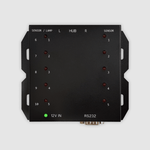
- AC-210.Ex Hybrid Hub connects all sensors and lamps via RJ45
- FHD-100 Smart Box PC provides RS-232 control, network connectivity, and remote management
- Remote Configuration Center (RCC) for centralised management across all rooms
- Expandable, multiple hubs can be daisy-chained for larger deployments
- Mix-and-match sensor types to suit different space layouts
| Specification | Detail |
|---|---|
| Hub (AC-210.Ex) | 140 x 120 x 24mm |
| Sensor (AC-211) | 85mm Ø x 46mm (H), 140° PIR |
| Lamp (AC-212) | 140mm Ø x 63mm (H), Green/Red/Off |
| Gateway (FHD-100) | 154 x 143.6 x 38mm, Android, RS-232 |
| Hub power input | 12V DC |
| Gateway power | DC 12V, 1.5A |
| All connections | RJ45 (sensors/lamps) + RS-232 (hub to gateway) |
| Operating temperature | 0-50°C (all components) |
Compatibility
- Suitable for meeting rooms, boardrooms, quiet zones, open-plan offices, and co-working spaces
- All components connect via standard RJ45 cabling
- FHD-100 connects to network via Ethernet (10/100) or Wi-Fi 802.11 b/g/n
Frequently Asked Questions
What is included in the Qbic Smart Meeting Room kit?
What is included in the Qbic Smart Meeting Room kit?
How do people see if a room is free?
How do people see if a room is free?
How is the system managed?
How is the system managed?
How do the components connect?
How do the components connect?
Can the system be expanded?
Can the system be expanded?
What warranty does it have?
What warranty does it have?
Get More From Qbic
-

Qbic + Software
View Software PartnersSoftware companies across the globe vouch for Qbic. See which software partners approve Qbic Hardware for use in their eco-system
-

Qbic Video Tutorials
Watch on YoutubeSee Qbic in action. Quick, practical videos that make setup simple - from installing APK files to connecting media players and mastering PoE.


Explore the Qbic Range


-

Matrix Switcher or AVoIP? How to Choose for You...
-

Beyond the Panel: What the Qbic Luminen Can Rea...
-

Qbic TD-1070 vs. Qbic Luminen 10": Which Qbic P...


